Auto Mode
Your Newsroom Keeps Publishing
While You Sleep, Travel, or Report
Turn on Auto Mode and let News Studio generate, schedule, and publish branded news posts every day — from your NewsEngine feed to every connected social channel — without anyone at the desk.
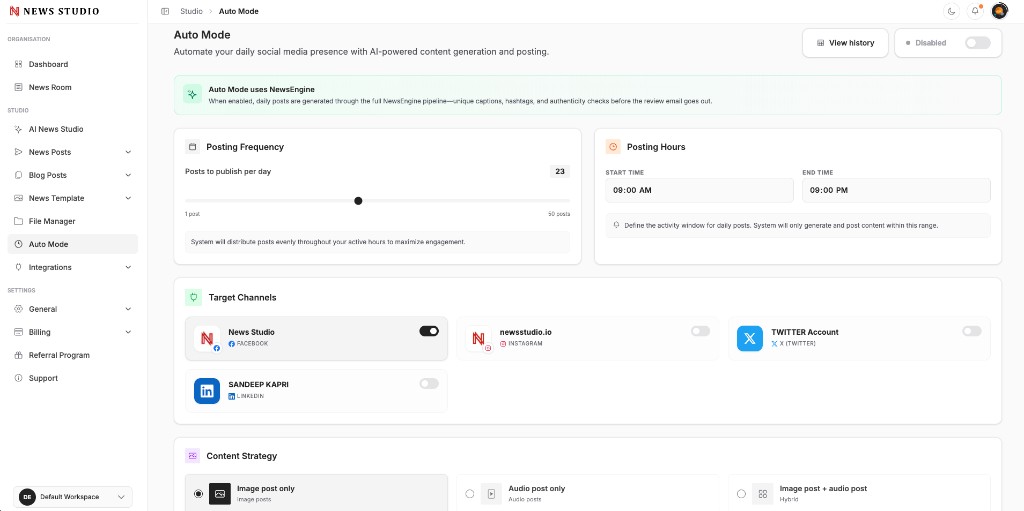
Everything You Need to Publish
Auto Mode is built into AI News Studio — the same workspace your team uses for news, templates, and social distribution.
Daily Automated Publishing
Auto Mode picks fresh stories from NewsEngine and your connected feeds, then generates and schedules posts on your cadence — morning briefs, evening roundups, or steady daypart slots.
Posting Frequency You Control
Set how many posts run per day — from a single daily digest to multiple hourly updates. Scale up for high-traffic periods or dial back when you want a lighter feed.
Posting Hours & Quiet Times
Define active windows so posts go live when your audience is online — and stay silent when your newsroom is offline. Perfect for weekends, travel, and overnight coverage.
Target Channels Per Run
Choose which connected accounts receive each automated batch — Facebook pages, Instagram, X, LinkedIn, and more — with channel-specific formatting handled automatically.
Content Strategy Rules
Filter by category, template, post type, and tone so Auto Mode reflects your editorial line — politics, sports, local, breaking, or mixed daily coverage.
Review & Safety Controls
Send posts to draft for approval, cap daily volume, and pause Auto Mode instantly. You stay in control of what publishes, even when publishing runs unattended.
How Auto Mode Works
Connect your feeds
Link NewsEngine, WordPress, or RSS so fresh stories are always available for automation.
Set your strategy
Choose posting frequency, active hours, target channels, categories, and post types.
Pick your review level
Publish automatically or route drafts to your team for a quick approval pass.
Go hands-free
Auto Mode generates, schedules, and publishes daily — while you sleep, travel, or focus on reporting.
Never Miss a Publishing Window
Audiences expect consistent updates — even when your team is asleep, on assignment, or covering a live event. Auto Mode keeps your social channels warm with fresh, on-brand news posts on the schedule you define.
- Publish during peak hours without late-night shifts
- Stay active across weekends and holidays
- Maintain presence while traveling or in the field
Less Manual Work, Same Editorial Standards
Automation should not mean generic output. Auto Mode uses your brand templates, NewsEngine pipeline, and content strategy rules so every post looks like it came from your newsroom — because it did.
- NewsEngine stories flow in automatically
- Branded image posts, carousels, and captions generated for you
- Draft review option before anything goes live
More Ways to Create
Explore other AI News Studio post types in the same workspace.
Upload and Schedule
Upload images or video files, write captions, and schedule posts for a specific date and time across connected social channels.
Learn moreImageImage Post
Create branded social media image posts from any news item in minutes. AI-powered captions, templates, and multi-platform previews built for newsrooms.
Learn moreImageMulti-News Carousel
Build carousel posts with one shared title and multiple news slides. Perfect for daily digests, breaking roundups, and top-story summaries.
Learn moreReady to Simplify Your
News Publishing?
Create posts, images, and reels from news and publish
across social media platforms in just a few clicks.
 FAQ
FAQAuto Mode FAQs
Common questions about Auto Mode in AI News Studio.