Image Post
Turn Breaking News Into
Scroll-Stopping Image Posts
Pick a story, apply your brand template, and publish polished graphics to Facebook, Instagram, LinkedIn, and more — without opening a design tool.
Everything You Need to Publish
Image Post is built into AI News Studio — the same workspace your team uses for news, templates, and social distribution.
News-to-Post in One Flow
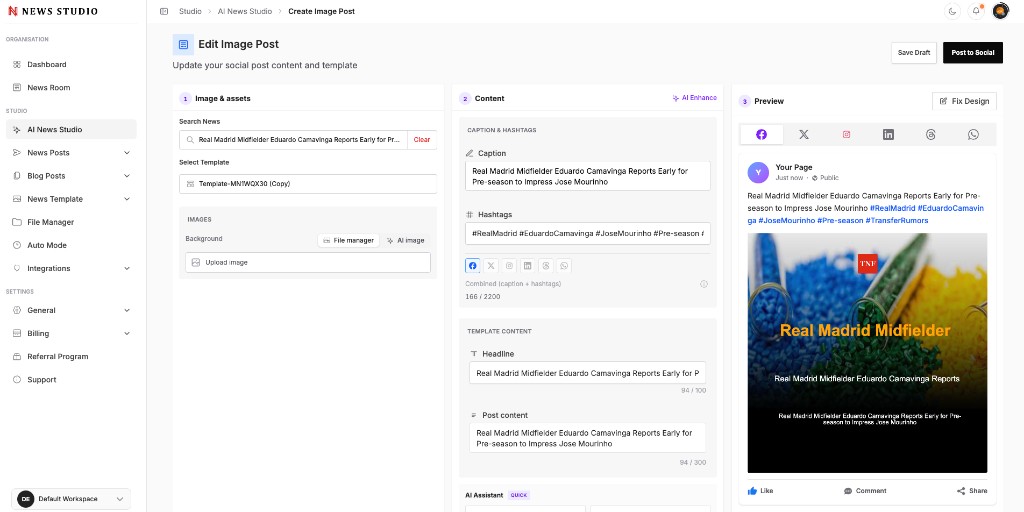
Search your newsroom, select a story, and auto-fill headline, caption, and hashtags — ready for social in seconds.
Brand Templates
Apply reusable templates with your logo, colors, and typography so every post looks on-brand.
Live Platform Previews
See exactly how your post will look on Facebook, X, Instagram, LinkedIn, Threads, and WhatsApp before you publish.
AI Content Assistant
Generate captions, rewrite copy, translate headlines, and tune hashtags with built-in AI tools.
Background & Asset Control
Upload images, pick from your file manager, or generate backgrounds with AI — all inside the editor.
One-Click Distribution
Save drafts or post directly to connected social channels from a single workspace.
How Image Post Works
Select your story
Search news from your room or paste a headline to get started.
Choose a template
Apply a branded layout with your logo, colors, and typography.
Refine with AI
Enhance captions, generate hashtags, and preview on every platform.
Post to social
Save as draft or publish directly to connected channels.
Publish Faster Than Your Competition
When news breaks, speed wins. Image Post removes the bottleneck between your editorial desk and social feeds — no handoffs to designers, no waiting on exports.
- Pull headlines and body copy from your newsroom instantly
- Template-driven design keeps quality consistent at scale
- Preview and publish across six major platforms
Built for Newsroom Workflows
Every field maps to your template — headline, post content, caption, and hashtags — so editors stay in control while AI handles the heavy lifting.
- Separate caption and template content fields
- Character counts for each platform
- Fix Design mode for pixel-perfect adjustments
More Ways to Create
Explore other AI News Studio post types in the same workspace.
Prompt to Post
Describe your story and let AI generate a full news graphic — no template required. Custom sizes for feed, story, and landscape formats.
Learn moreImageMulti-News Carousel
Build carousel posts with one shared title and multiple news slides. Perfect for daily digests, breaking roundups, and top-story summaries.
Learn moreImageUpload and Schedule
Upload images or video files, write captions, and schedule posts for a specific date and time across connected social channels.
Learn moreReady to Simplify Your
News Publishing?
Create posts, images, and reels from news and publish
across social media platforms in just a few clicks.
 FAQ
FAQImage Post FAQs
Common questions about Image Post in AI News Studio.